Same with Rack4U - he has a beautiful GS sitting behind the Avanti in the shop and has a couple of BBB's for it. It's been a drag race car for some time but I'd love to see it back on the street.
Picked up the wire I needed and got the LCD and computer up and running in the car
I didn't want the LCD screen to be powered solely by the car computer, basically to keep the voltage and amperage load to a minimum so I got a cigarette lighter to USB power adapter and modified it so I could hardwire it to a key'd power source. After I took this picture I tested it and it turns out the car computer was back feeding voltage to the fuse box when I'd turn the car off, so off it came and I added a good sized diode to the positive wire and that solved that.
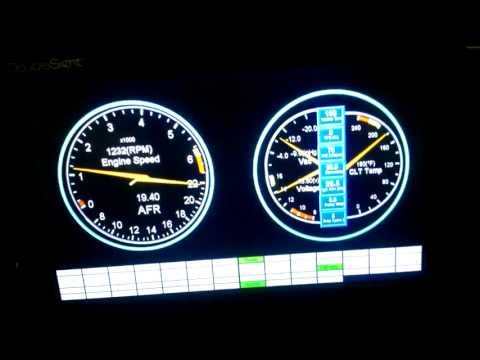
Here is a test run. Tomorrow I'm driving to Salt Lake City after work, so it'll be a good test run on the long haul.
There are still a few bugs to work out. Namely the screen hangs up if I turn the key off and turn it back on before the computer shuts down. It's a power issue to the screen. In my mind I have two ways to solve this. One is to plug the power port back into the computer, which I don't want to do. Or two pick up a new USB connector for the LCD (common micro USB port to two big USB ports like on portable hardrives) and hack the wiring so all power comes from one USB connector. I bought the 3amp USB adapter so one plug should support the power load. I "think" this will work. If not, I'll live with the computer powering the monitor. I've since reduced the computer to shutting down after one minute instead of 30 minutes as a work around to the screen hang up. If I can split the power I'll probably go back to 30 minutes so it's not rebooting just to stop for gas, go in the grocery store, etc.
I can design the gauges to just about anything I can think of. I figure I'll make a couple different types. Ones like the one shown I'll call a classic lay out. I can have bar gauges, graphs, digital readouts, and any combination of.
I wonder if there's a way to have the computer powered all the time, but give it a "shut down" command using a timer, so it turns off after the key has been off for a minute or two (or five or ten or whatever). Might be nice for those times you are playing with things and need to start/stop the engine repeatedly.
Also, how does the display work in bright sunlight?
I can design the gauges to just about anything I can think of. I figure I'll make a couple different types. Ones like the one shown I'll call a classic lay out. I can have bar gauges, graphs, digital readouts, and any combination of.
Randal, you need to stop living by yourself. While I live vicariously through your growth in the electronics arena, you have far too much time on your hands. LOL. Great work as usual.
I wonder if there's a way to have the computer powered all the time, but give it a "shut down" command using a timer, so it turns off after the key has been off for a minute or two (or five or ten or whatever). Might be nice for those times you are playing with things and need to start/stop the engine repeatedly.
Also, how does the display work in bright sunlight?
The power module I'm using is designed for cars and has three timer settings, and if you buy the special serial cable a custom set of timer settings. I had it set to stay on for 30 minutes then hibernate, but after I found the monitor did not like it's power turned off on only one of the USB ports because hangs up the screen (stays white), which unplugging the monitor from the computer then plugging it back in fixes it, or having the computer shut down completely. So I downed the hibernate time to 1 minute so if I hang it up it's only a minute and a half wait to reboot. This problem can be completely avoided if I ran both LCD USB cables back to the computer. Then the screen wouldn't turn white when I turn off the car, it would just dim and say the MegaSquirt isn't connected and stay lit until it hibernates. What I am trying to avoid is powering the screen for 30 minutes while the key is off, while the computer stay powered for that duration. Just as a power savings measure and to reduce the power load and heating in the computer.
I'll find out on Wednesday for sure how the screen looks in the sun. I'll see tomorrow how it looks in the dark. One thing about the sun light, is how it looks will probably change once it's behind the plastic cluster lens and shielded a bit by the dash over hang. Worse case I figure I can put a very light tint material on the inside of the cluster lens to reduce glare.
What about hacking the power switch to the monitor (assuming it has one) and having that run to a relay that is on in "Run/Start/Bulb Test"? That way the computer turns its self off after a time that's convenient for boot up and such but the monitor is tied in to if the car is "on" or not.
Also, don't know how fancy the screen is but are you going to able to keep it bright enough during the day while not blinding you at night? Something like a switched brightness control or a backlight that comes on with the rest of the gauge lights?
I haven't ran the screen at night yet so I don't know how bright it is. Didn't have too much trouble seeing it with my sun glasses off driving to Salt Lake today, but I did notice that if I looked squarely at it that it was brighter as opposed to off to the side. I know that there were some feature requests of Tuner Studio to be able to change the display colors/settings based on a megasquirt input so it could be changed when the headlights come on, but I never read if it was implemented or not. Doesn't seem to be, but I want confirmation one way or the other.
The computer could be hooked into the car stereo system rather easily, but it would work better if I had a touch screen display. As is, the radio in the car has a micro SD card with all my music on it already so no real need.
The car is running extra lean for some reason. I unhooked the second fuel pump line in case it was back feeding and loosing fuel pressure, but that didn't seem to change anything. I think the barometric correction table has been tampered with since the last firmware version I was running (I updated the firmware to the latest a week or so ago). I have to adjust the y-axis dramatically to get it to even show my corrections. They used to center around 0% as "normal", but now seem to center around 100% as "normal". I tried playing with it and its doesn't seem to be having as large of an effect as I'd expect. I don't want to tamper with the actual fuel table as the AFRs were pretty good in Ely so I think it's either a fuel pressure issue or a software issue. I'll check the fuel pressure tomorrow morning when it's cold.
Also my alternator has been acting up. It's brand new and I've had trouble with it charging. I ran by an autozone and it failed the voltage regulator test. I haven't decided if I'm going to do anything about that while I'm here and just test my luck running back to Ely since it tends to charge just fine at highway speeds. I guess that's why we do testing?
 Tweet
Tweet




Comment